
Open-source RF & antenna analysis
Advanced Antenna Analysis.Beautifully Engineered.
AntennaFox turns S11 sweeps into clear visualizations, actionable antenna-matching insights and professional engineering reports. An independent, open-source RF and antenna analysis desktop application.
Currently supports LibreVNA. Additional VNA integrations are planned.
Conceptual visualization · not measured dataScroll to explore ↓
02 — The application
From signalto understanding.
One desktop environment to run live sweeps, read the results across every common RF view, and turn them into professional engineering reports.
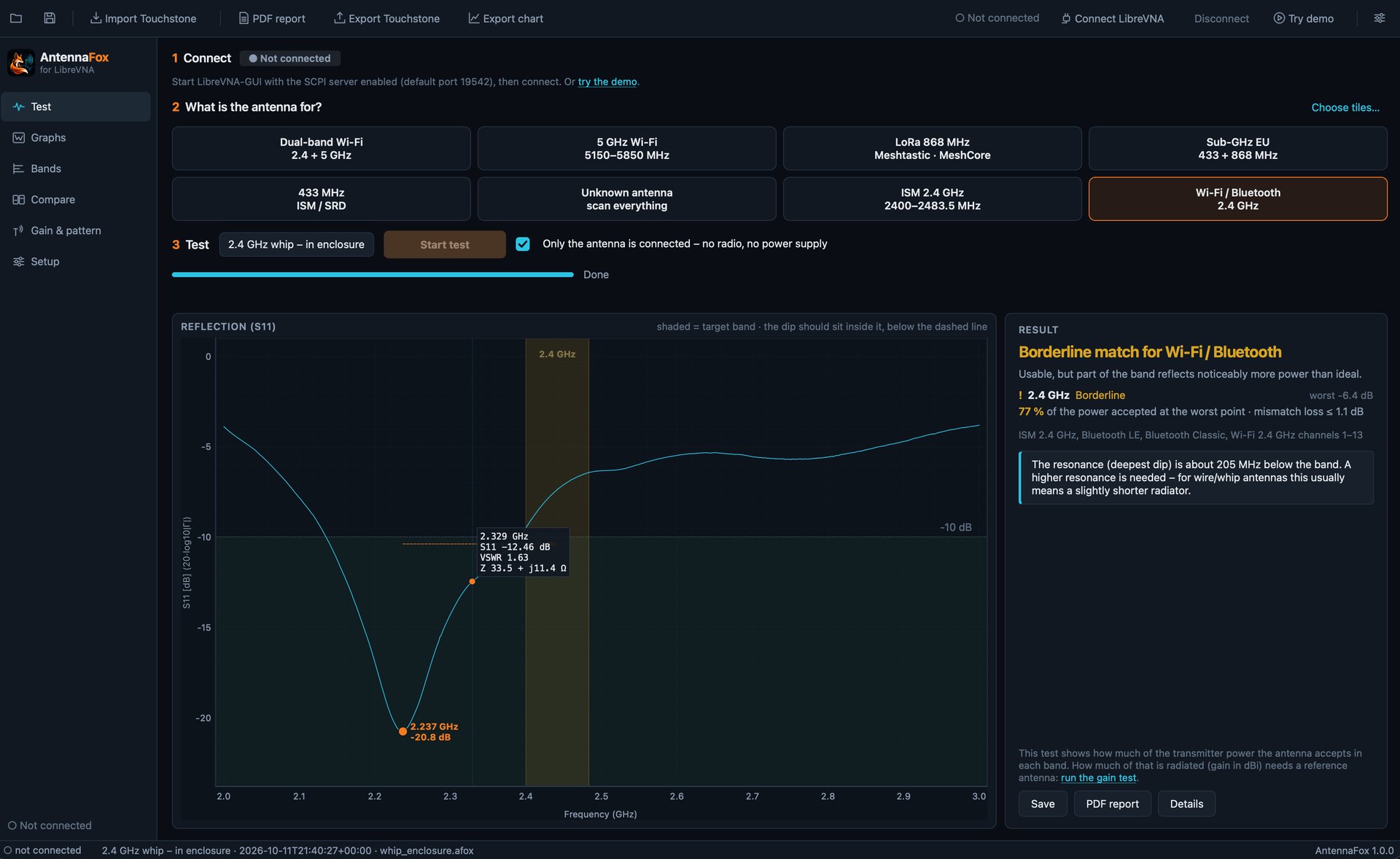
A · GUIDED TESTSPick what the antenna is for and get a plain-language verdict with the resonance marked.
B · RF VIEWSReturn loss, VSWR, impedance and Smith chart, with markers and key values.
C · LIVE SWEEPLibreVNA through LibreVNA-GUI's SCPI interface, with cancellable sweeps.
03 — Guided antenna tests
Tell it what theantenna is for.
Choose an application, any of the 25 catalog bands, or your own. AntennaFox sweeps, checks the match across every band and explains the result in plain language, with the resonance marked.
+ 25 catalog bands · custom bands & presets
VERDICTPASS
BAND2400–2483.5 MHz
RESONANCE2445 MHz
−10 dB WINDOW2371–2519 MHz
WORST S11 IN BAND−14.2 dB
POWER ACCEPTED (WORST)96 %
Matched. S11 stays at or below −10 dB across the band, so at least 96 % of the power from the feed is accepted at the worst point.
Demonstration data. Guided tests rate impedance matching from S11 over each band, against an example −10 dB criterion. They are not a certification or protocol-compatibility test and do not measure gain, radiation efficiency or range.
04 — Explore your signal
One sweep. Four ways to read it.
ILLUSTRATIVE · Demonstration data from a simulated resonant antenna model, 2.0–3.0 GHz. Not an application screenshot.
05 — Engineering reports
From measurementto meaningfuldocumentation.
AntennaFox turns a sweep into a structured four-page PDF: assessment, plots, engineering details and traceability, with assumptions and limitations stated plainly.
P.01
Executive overview
Executive overview
P.02
Measurement visualizations
Measurement visualizations
P.03
Engineering details
Engineering details
P.04
Traceability
Traceability
Executive overview
- Verdict, scope and acceptance criterion
- Antenna, project, operator and DUT fields
- Band table with S11, VSWR and impedance
- Power accepted and mismatch loss
- 01Structured engineering reports
- 02Reproducible measurement documentation
- 03Readable charts and technical results
- 04Clear assumptions and limitations
- 05Shareable PDF output
Explore a Sample ReportDemonstration report · simulated data · PDF
06 — Compare measurements
Before and afterthe enclosure.
Put an antenna in its housing and the resonance moves. Overlay sessions, imported Touchstone files and the current sweep, and AntennaFox compares them band by band: worst and best S11, usable bandwidth, the change between them and the resonance shift.
- Sessions · .afox
- Touchstone · .s1p / .s2p
- Current measurement
PER BAND, BY DESIGN · NO OVERALL RANKINGVALIDATED AGAINST THE LIBREVNA-GUI EMULATOR · HARDWARE VALIDATION IN PROGRESS
A · BARE ANTENNAB · IN ENCLOSURE
BANDA WORST / BESTB WORST / BESTΔ WORST
ISM 2.4 GHz−13.2 / −21.5−4.4 / −15.3+8.8 dB
Bluetooth LE−13.5 / −21.5−4.6 / −15.2+8.9 dB
07 — Honest by design
Confident aboutwhat it measures.
AntennaFox states what each result shows and what it does not. The same distinctions appear in the app, in every report and on this page.
- Matching ≠ gain
- S11 results state “Gain: Not measured”. Gain in dBi appears only from a comparative S21 study with a trusted reference antenna.
- Accepted ≠ radiated power
- Results show the power the antenna accepts and the mismatch loss, and state that radiated power is not measured.
- Band match ≠ compatibility
- Band results rate frequency matching only. They are not a certification or protocol-compatibility test.
- Simulation ≠ measurement
- Simulated data carries a SIMULATION badge in the app, and a banner and watermark in every PDF.
- Calibration awareness ≠ calibration
- OSL calibration is performed in LibreVNA-GUI. AntennaFox reads and records it, runs a 50 Ω load check and lowers the evidence grade when calibration is unconfirmed.
08 — Workbench
Open data. Repeatable workflows.
Your measurements stay yours: open session files, standard Touchstone exchange and reports you can trace back to the data.
- 01Live LibreVNA acquisitionVERIFIED ON LIBREVNA V1 HARDWAREThrough LibreVNA-GUI's SCPI interface, with resync-safe communication, cancellable sweeps and SCPI logging.
- 02RF viewsReturn loss, VSWR, complex impedance and Smith chart, with markers and a key-values table.
- 03Resonance and bandwidth−10 dB windows, resonance offset, tuning hints, power accepted per band and evidence grading.
- 0425-band catalogWi-Fi 2.4 / 5 / 6E, Bluetooth LE and Classic, ISM, LoRa and other sub-GHz bands, GNSS, plus your own bands and presets.
- 05Touchstone v1.s1p and .s2p import and export in RI, MA and DB, Hz to GHz. Analysis at 50 Ω; export of single-segment sweeps.
- 06Open session filesNative .afox sessions: an open ZIP of JSON and CSV, with SHA-256 integrity checks.
- 07Calibration awarenessReads LibreVNA-GUI's active calibration, records your confirmation, runs a 50 Ω load plausibility check and grades evidence A–D. Calibration itself is performed in LibreVNA-GUI.
- 08PDF engineering reportsVerdict, criterion, band table, plots, Smith chart, markers, calibration record and report ID.
- 09DiagnosticsA diagnostics bundle and SCPI logs for troubleshooting.
- 10Comparative gainIMPLEMENTED — HARDWARE VALIDATION IN PROGRESSGuided 8-step S21 substitution workflow with a characterized reference antenna: realized gain in one direction and polarization with a k=2 uncertainty budget, or relative dB without a trusted reference. Not peak gain, efficiency or a 3D pattern.
09 — Hardware
One analysis environment. More instruments ahead.
- SUPPORTED
- PLANNED
- UNDER CONSIDERATION
SUPPORTED
LibreVNABuilt for LibreVNA, the first supported live backend, through LibreVNA-GUI's SCPI interface. Verified on LibreVNA V1 Rev.B with LibreVNA-GUI 1.6.5: connection, sweeps, cancel and calibrated load/open/short.
- LiteVNA 62 / 64PLANNED
- NanoVNA-H / H4UNDER CONSIDERATION
- NanoVNA V2 / V2 Plus4UNDER CONSIDERATION
- miniVNA familyUNDER CONSIDERATION
Currently supports LibreVNA. Additional VNA integrations are planned. AntennaFox reaches instruments through a backend interface and adapter registry; today there is one live adapter. The built-in simulator supplies demonstration data and is not an instrument. Devices marked planned or under consideration do not work yet.
10 — Open source
Built inthe open.
SOURCE
The full source code is public. Development happens transparently, and contributions are welcome.
github.com/AltinumTechnologies/antennafox ↗LICENSE
Released under GPL-3.0-or-later. Independently developed by Altinum Technologies®.
BUILT FOR LIBREVNA
LibreVNA is the first instrument AntennaFox supports, and we are grateful for the work of the LibreVNA project. AntennaFox is developed independently and is not affiliated with or endorsed by LibreVNA's developers.
11 — Get AntennaFox
Download AntennaFox.
Free software under GPL-3.0-or-later. A packaged app is available for macOS on Apple Silicon. On Windows and Linux, run AntennaFox from source.
Live measurements need a LibreVNA with LibreVNA-GUI and its SCPI server. Currently supports LibreVNA. Additional VNA integrations are planned.
PLATFORMSGitHub Releases
macOS · Apple SiliconPackaged appWindowsRun from sourceLinuxRun from sourceWindows and Linux installers are on the roadmap.BUILD FROM SOURCE · PYTHON / QT
$ git clone https://github.com/AltinumTechnologies/antennafox.git
# then follow the platform requirements in README.md